Change Your Password in Outlook on the Web
Here's how to change your password using Outlook on the Web.
-
If you are not using a mobile device to change your password, set your mobile devices to offline/airplane mode to temporarily disable network access.This step will prevent these devices from locking your account as they attempt to connect to MU Secure or your email account with an outdated password.
- If you use an email program such as Outlook, exit from it.
- Go to outlook.office.com.
- If prompted, enter your marquette.edu email address and password.
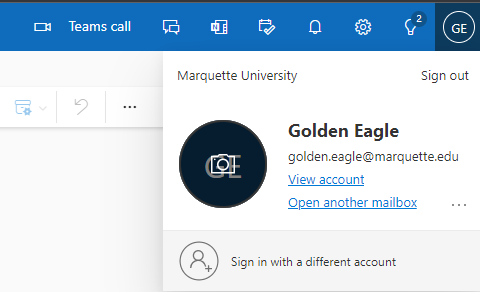
- Once you are logged in to your account, on the top right, click or tap your initials or profile image. Then select View Account.
- The "My Account" page appears. Select Change Password.
- The "Change password" page appears.
Enter your current or "old" password.
Then enter your new password. Follow the password requirements.
Re-enter your new password to confirm it.
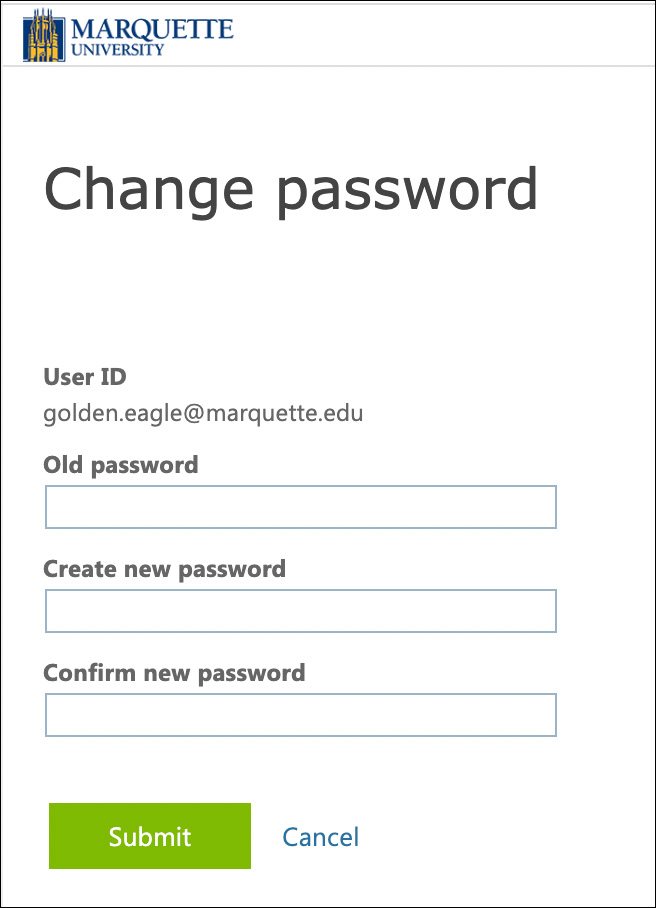
- Click or tap Submit.
- If the change was successful, you are prompted to log in again. Confirm you can successfully log in.
- Turn on network access on wireless mobile devices and update your password on mobile devices.
Did you know? Marquette passwords created as of March 8, 2023 no longer expire.