














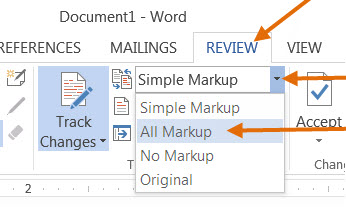
Avoid unintentionally distributing hidden information, such as the document author and names that are associated with comments or tracked changes, by removing hidden data. All the revisions that were made to a document while the Track Changes feature was turned on remain part of a Word document until they are accepted or rejected. All comments that were inserted remain in the document until deleted. To show all changes and comments, click the Review tab on the ribbon, and click All Markup on the Tracking group.
Use the Document Inspector to remove hidden data
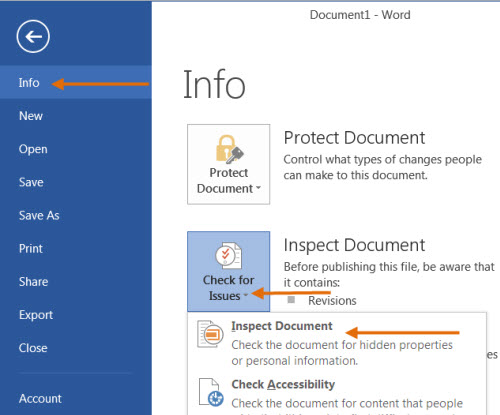
- To open the Document Inspector, click File > Info > Check for Issues > Inspect Document.
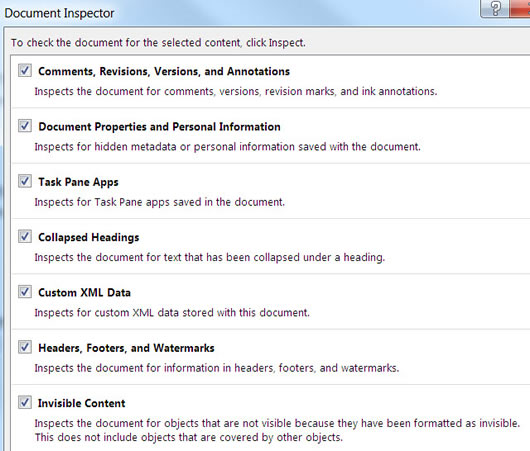
- The Word Document Inspection window shown below opens up.
- Click Inspect to identify hidden content.
- Click Remove All to remove the item of your choice, for example all comments, revisions, versions and annotations.
- After you have completed these steps, save the document, and it will no longer contain the items you have removed.
Edit Document Properties, Personal Information and other document data
To selectively edit document data, click the File tab > Info. Properties show in a pane on the right. Click Show All Properties. To add or change properties, hover your pointer over the property you want to update, for example Author, and enter the information. Click the File tab to return to your document and changes you made will be saved automatically.
Hide revisions or comments
Remove all revisions or comments as outlined above.
Remove Tracked Changes manually or selectively
If you turn on Track Changes, Word will save all changes and comments made.
- Click the Review tab on the Ribbon.
- Click the down arrow on Track Changes > Track Changes to turn it on or off. Track Changes: On or Track Changes: Off will display on the status bar (bottom bar in the document.) If this is not showing, right-click the status bar, and check Track Changes.
The tracked changes in a document remain even after you have turned off Track Changes. To remove all tracked changes from a document, be sure that all changes are showing, and then do the following:
-
Click the Review tab on the ribbon. Click the Accept down arrow in the Changes Group
-
To accept all changes, click Accept All Changes in Document. To reject all the changes, click the Reject down arrow > Reject All Changes in Document.
-
To selectively accept or reject changes, click Accept and Move to Next or Reject and Move to Next. Click Next to move to the next tracked change.
Repeat this until all the revisions in the document have been accepted or rejected.
Edit Comments or Remove them selectively
-
Click the Review tab and click Next on the Comments group to advance from one comment to the next.
-
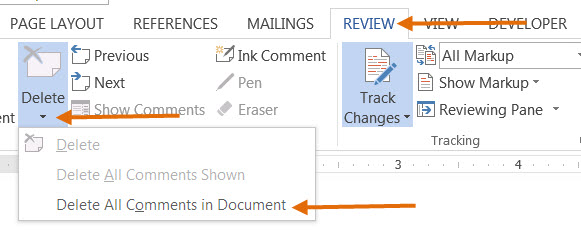
To remove a comment, you must delete it. Click the Review tab >Delete to delete the comment that is highlighted, or click on the Delete down arrow, and click Delete or Delete All Comments in Document.
Back to Removing Hidden Data Home
TRAINING & DOCUMENTATION
MORE ABOUT OUR SERVICES
Computer Labs & Smart Classrooms
Help with Computers & Printers
