Introducing EmpCenter HUB
staff and managers. This upgrade is part of an effort to modernize the system’s user experience while continuing to support the same reliable timekeeping processes our community uses today.
What Is Changing?
The most noticeable change will be the look and feel of the home (HUB) screen. The changes introduce a refreshed, modern interface designed to make information easier to view and access.

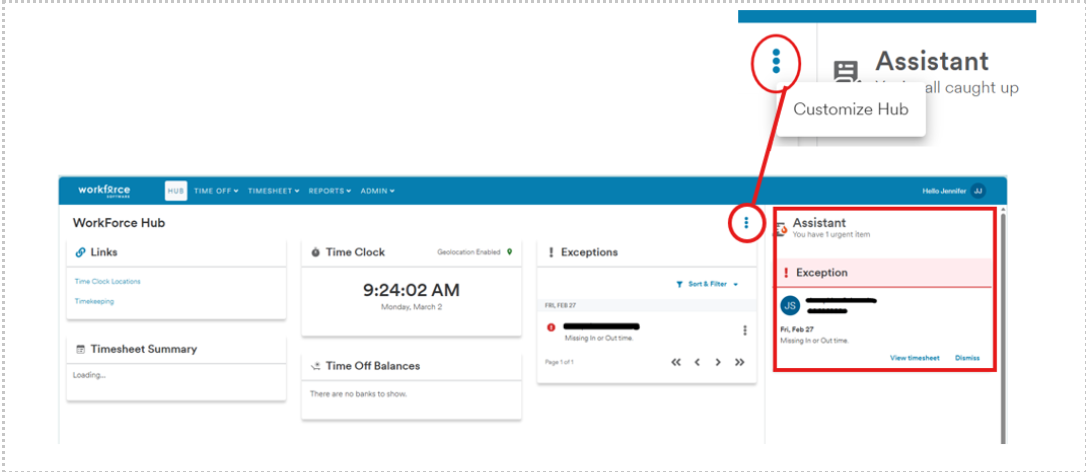
One such change is the Dashboard experience that uses Hub Cards, which are displayed based on a user’s role (employee, manager, or both). These cards act as real-time widgets and provide quicker access to commonly used information and actions while keeping familiar processes intact. You can add, move, or remove Hub Cards from your home screen. by clicking the three vertical dots in the middle, just to the left of the Assistant section.
Another change is the new Assistant messages, to help identify and resolve common issues more easily. These messages may appear when entering time or reviewing records and alert you to missed punches, I9 reminders and time off requests.
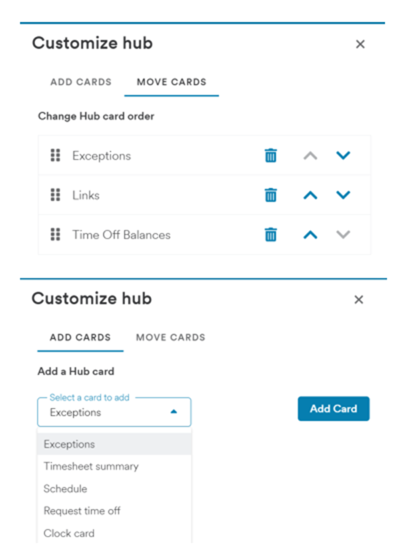
From the MOVE CARDS tab, users can reposition Hub Cards up /\ or down \/ on their page, or they can delete a card to remove it from view. The card can be reactivated using the ADD CARDS tab.
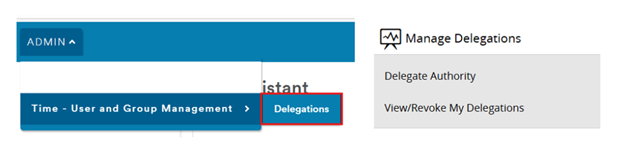
Managers and Timekeepers should note the new navigation to delegate employee groups to other supervisors in preparation for their own absences, or to assign additional approvers. Click on the ADMIN menu at the top of the Hub page, click Time-User and Group Management, then click Delegations. This brings up the familiar menu options.
Important
There will be no change to EmpCenter functionality or timekeeping processes. Employees and managers will continue to:
- Clock in and out as they do today
- Review and approve timesheets
- Request and approve time off
- Review time off balances, and exception messages
All existing rules, approvals, and workflows will remain the same.
Resources
Click on your name in the upper right corner of the main HUB screen to see a link to online Help topics.

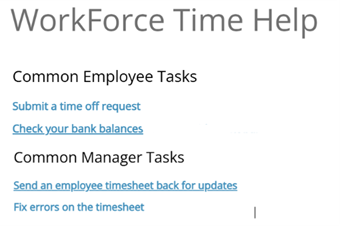
Questions regarding the EmpCenter application or this upgrade may be directed to Payroll Department, Human Resources or Student Employment.