
-
- Online Course Development
- Online Program Development
- Program Guidelines
- Accessible Technology
- Center for Teaching and Learning
- Contact Us
- For faculty and staff questions about online teaching or course design, submit your questions to the Learning Technologies portal.
Walk-in Consultation Hours for Faculty and Staff
Monday-Friday 9 a.m. - 3 p.m.
Room 326 Raynor Library
For more in-depth questions and course consultations, schedule an appointment with one of our Instructional Design and D2L Specialists
PROBLEM WITH THIS WEBPAGE?Report an accessibility problem
To report another problem, please contact emily.newell@marquette.edu.
Exclude from Final
The Grades tool provides an efficient way to exclude grade items from the final grade calculation. Use the Bulk Edit option to select and update multiple grade items at once.
Note: This feature is available only in courses that use the Points grading system.
Excluding Grade Items
- Go to Assessments on the main navigation to select Grades from the dropdown menu.
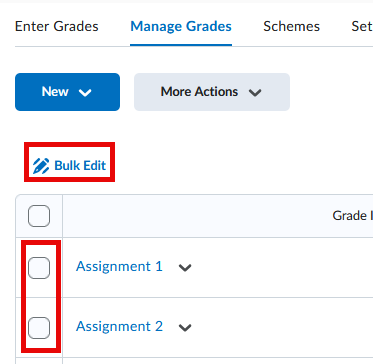
- Click Manage Grades tab.
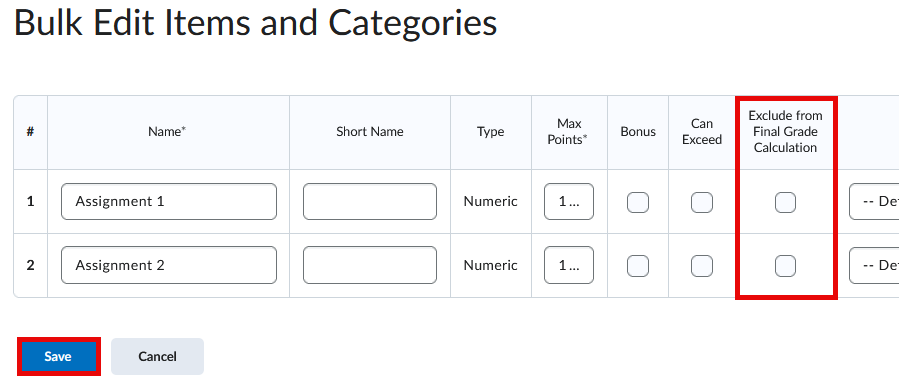
- Select the checkboxes next to the grade items you want to exclude from the final grade, then choose Bulk Edit.
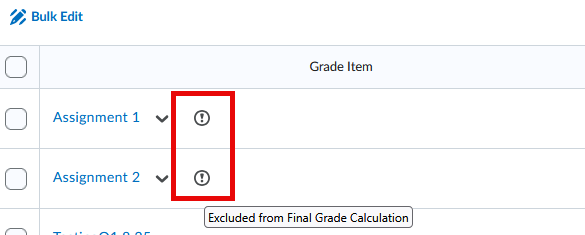
- Click Save. Once saved, you should see an exclamation mark icon next to the selected grade items.