

-
- Online Course Development
- Online Program Development
- Program Guidelines
- Accessible Technology
- Center for Teaching and Learning
- Contact Us
- For faculty and staff questions about online teaching or course design, submit your questions to the Learning Technologies portal.
Walk-in Consultation Hours for Faculty and Staff
Monday-Friday 9 a.m. - 3 p.m.
Room 326 Raynor Library
For more in-depth questions and course consultations, schedule an appointment with one of our Instructional Design and D2L Specialists
PROBLEM WITH THIS WEBPAGE?Report an accessibility problem
To report another problem, please contact emily.newell@marquette.edu.
Email a copy of an announcement to Classlist
You can send a copy of a news item or announcement to students by email. Keep in mind that students who have already opted in to email notifications for announcements will receive two messages: one from the notification system and one from the email copy. Students who opted out of news notifications will receive only the emailed copy.
Send Email Copy
- Go to Course Home on the main navigation bar.
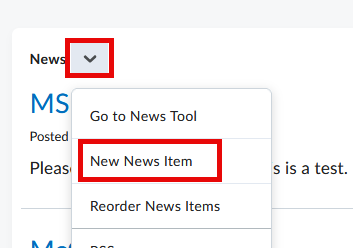
- From the News dropdown, select New News Item.
- Check Send Email Copy.
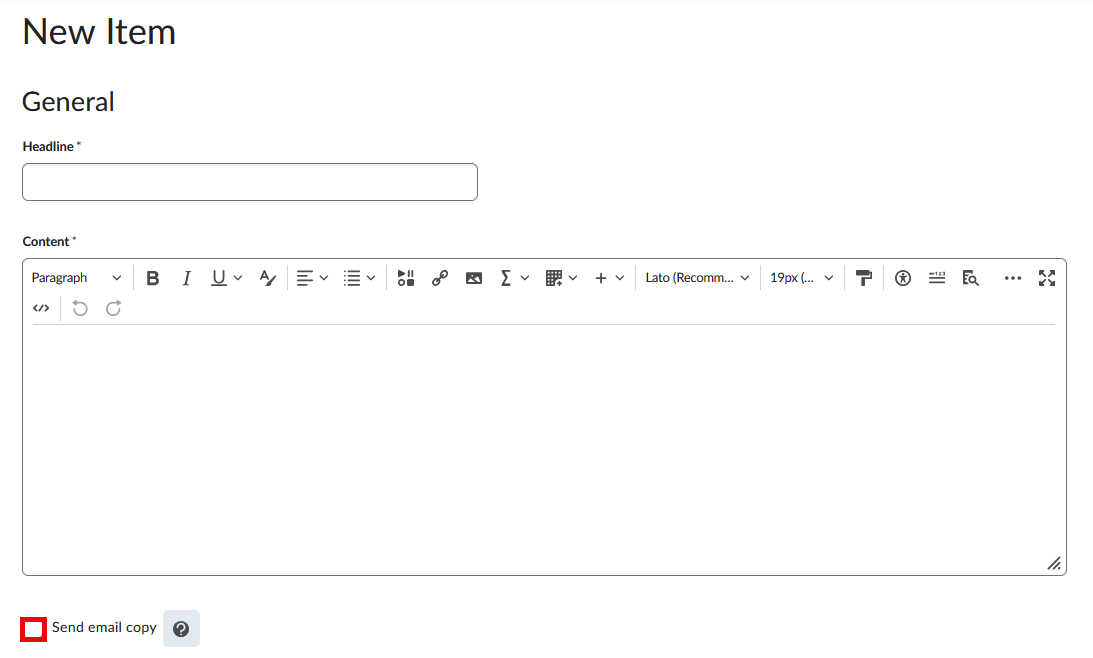
- Choose Publish to send the news item and email. If you choose Save Draft, neither news item nor email will be sent.
Important: When copying an entire course or selected news item(s) to another course site, the Send Email Copy checkbox resets. Before publishing, reselect the checkbox if needed.